Trove - Gemma 4 Hackathon project post-mortem
The Gemma 4 Good Hackathon is a Kaggle competition that has been sponsored by Google to celebrate the release of their Gemma 4 family of local multimodal LLMs, comprising four models: e2b, e4b, each respectively only loading 2 or 4 billion parameters at a time, 26b which is a Mixture-of-Experts model, and 31b. They’ve almost immediately been available on Ollama too in quantized form. The theme of the competition was to:
[…] create a solution that addresses a real-world challenge using Gemma 4 models, whether that’s an application that helps millions or a specialized model that could exponentially scale innovation.
My take on this concept was to develop Trove. The idea of it is to be a simple way to set up a small local model to be served across a given space (for example, a classroom) from a central device with the power to run it to client devices that can’t. This limits the maximum rate of usage of course, but it also removes the complexity of installing something in each device and works well even with very old or simple phones (one of the strong promotional points about Gemma 4 is that it’s small enough to allow running inference on smartphones, but if we’re looking at applications with social impact I think we can consider that many settings might not have everyone equipped with a sufficiently powerful device).
You can see my writeup about it here, which includes a link to a video with a demo. Here I want to focus more on giving snippets about particular design decisions and the process of creating it.
UX design#
There’s a complexity ladder to working with Trove:
- installing it requires having a Linux computer and using an installation command from the terminal, then a graphical setup wizard. This isn’t terribly hard but it can already I guess be daunting for some people. It also needs some configurations at the network level (to ensure the serving device has a static IP, so it can be reached reliably). I’m assuming here an “IT assistance” level of knowledge - at a school, this might be whoever takes care of computers in general. It needs to be done once and never again;
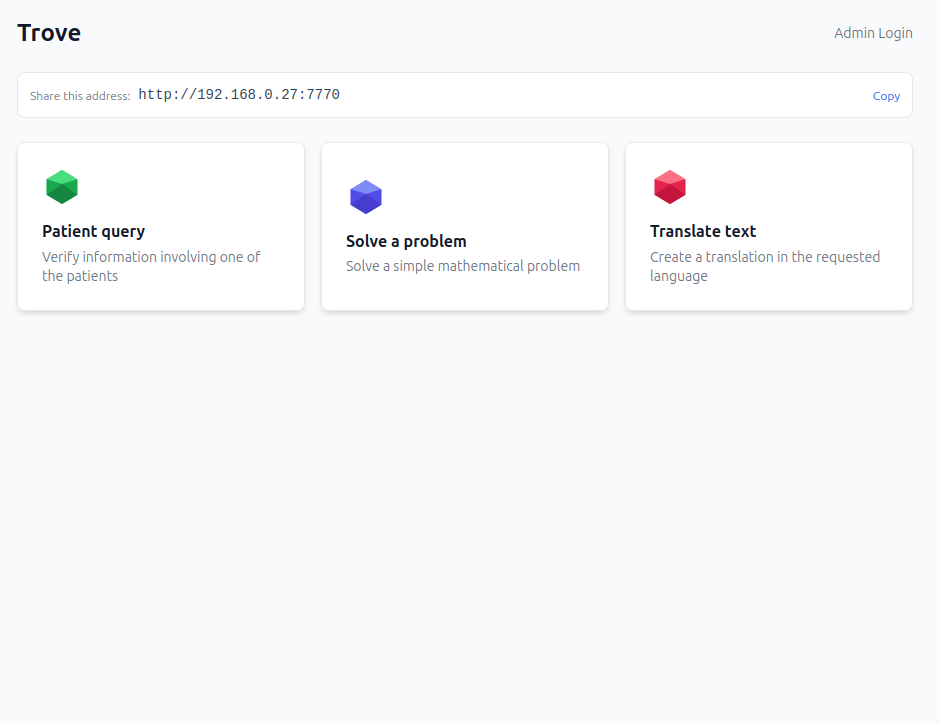
- being an administrator requires password access from the server machine. It then enables you to set up the base model and context window to use as well as uploading documents and define new “gems” (the single-shot agentic tasks that are going to be provided to the users). There’s abundant information boxes explaining each of these features. Writing a gem requires using the classic Jinja template double braces to include new fiels, e.g.
{{ topic }}, and this syntax is also explained in info boxes; - a user only sees cards representing each gem, and tapping on them opens a simple form.
My hope here is that while step 1 requires specialised knowledge, step 2 would be accessible by anyone with a modicum of experience with software and step 3 is so simple it’s just intuitive.
Security#
Security was a pain point I was aware of going in, and this being a prototype, it’s probably still not at a fully satisfactory level. The core security layer is of course that everything is supposed to run inside a local network to begin with - the server serves via 0.0.0.0 but nothing past the local router should be able to access that unless it has a VPN. However in theory there’s still risks, for example of some attack via a malicious browser extension in the users’ devices. To strengthen the security against that:
- CORS was blocked
- setup and administration were limited to localhost access (
127.0.0.1only) from the server machine - an HTTP-only cookie is used for authenticating every admin request
- user sessions receive a token that they need to post with every successive request
This is rather minimal. I had a plan to include rate limits and ideally HTTPS but the latter in particular gets complex to set up. Unfortunately, the lack of HTTPS also killed one other feature I had hoped to leverage - Gemma 4’s ability to process audio on top of text and images. It turns out that microphone access is only allowed in HTTPS contexts, so that pretty much killed the plan unless I was willing to guide the system administrators to setting up a local certificate authority. Seemed too much of a complication and so I left it out for now. As far as future developments go, this would be a great candidate for improvements.
AI coding#
Due to the fact that this was a large project to do in my spare time in the space of ~2 months, I couldn’t have made it if I hadn’t used AI assisted coding. Most of the work was done with Claude Code combined with the extremely powerful Superpowers plugin. I gave the agent an overview of the project, then focused on planning and developing one feature at a time, usually giving indications for the architectural details I deemed important, steering the key choices (especially user-facing ones) and picking external libraries to use. The stack comprises of a Python server backend and a TypeScript/HTML front end; it makes use of, among other things:
- Pydantic AI for the agents and the integration with Ollama
- Fast API for the server
- markitdown to help convert uploaded documents to Markdown for feeding into the agents
- React for the frontend’s status and interactivity
- Flowbite for the actual frontend components.
While using Flowbite means the app comes out having a slightly more “standardised” look than if I had let Claude design it entirely, enforcing its use means less custom components and styling sprinkled throughout the codebase which made the code more readable and saved on tokens. I have a Pro subscription and often a large feature could require two whole sessions to implement, so savings were a consideration for me. The Superpowers plugin uses a lot of tokens for planning, though that’s a price worth paying because it significantly reduces the errors it makes. Even so, I am not always satisfied with what the code ended up looking like. My impression is that this level of supervision was still slightly suboptimal - it resulted in working code but not as clean and readable an architecture as I may have hoped, with some unnecessary coupling here and there. One thing I’d do as a next step if I will develop this project further is a more granular refactor from the ground up. It also drove me to think of another project to help with this that I hope to showcase soon.
Installation#
The installation script was one of the trickier parts of the whole process, but I wanted to get it right because I wanted to make sure this was easy to set up. The complexity involved is of course that Trove isn’t entirely self-contained, and it uses Ollama to provide it with AI services, which in turn needs to download an external Gemma 4 model.1 In the end, the install script I came up with does the following:
- queries the Github API for the latest release of Trove, which should contain a Python wheel, and downloads it;
- creates a folder in which it downloads and installs a copy of
uv, the Python package and virtual environment manager; - uses
uvto install the wheel in a local virtual environment; - downloads its own copy of Ollama;
- sets up scripts in the
PATHof the system that can launch the Python script with the correct environment variables to direct it to use the local versions of bothuvandollama.
This way, each installation is fully controlled, self-contained and reproducible (well, within limits - it’s not a Docker image) from a single command line. Ollama eventually also downloads its own models in an isolated folder, where it won’t interfere or overlap with any system-wide installations of itself. The downside of this means that even if you have a Gemma 4 model already downloaded it’ll just download a second copy again; to avoid that, I’ve also included support for an option to use the global system Ollama, in which case the script will intentionally skip downloading its own copy and refer to the system’s one instead.
Presentation#
The hackathon submission required a 3 minutes video presentation. This was actually quite fun to make, as video recording and editing isn’t something I’ve done much at all of before, and what experience I have is from decades ago. I ended up converging on the following stack:
- Da Vinci Resolve for non-linear video editing. This is pretty much the premier free (though not open source) video editing software available. I tried a bit with some open source applications first (KDEnlive, OpenShot) but this is one field where sadly FOSS is hopelessly behind the proprietary alternatives. Da Vinci was complex but allowed me to do everything I wanted, including some vector graphics animation and compositing of the demo videos;
- Adobe Podcast Studio for audio enhancement. All videos were shot with a Nikon camera and its integrated microphone, which means audio quality was much inferior to video. This AI service helped me correct it significantly, removing noise and making speech a lot clearer;
- Inkscape for the basic vector graphics (the “gem” design though was created directly in text by Claude Code);
- Remotion for the presentation graphics. I just found out about it during this project and it was perfect, creating advanced animations via code; I let Claude Code actually write the code with a description of what I wanted the presentation to look like.
The videos were shot by my wife, who’s a professional photographer and videographer (shout out to Flavia Catena Photography), with one of her cameras. Soundtrack is “Deliberate Thought” by Kevin MacLeod, the composer who single-handedly fuels 70% of the YouTuber industry by providing a frankly ridiculous amount of completely royalty free instrumental tracks (if anyone’s ever played Kerbal Space Program, the entire OST of that game comes from his library too).
You can see the final result here.
Conclusions and future developments#
The Gemma 4 Hackathon has 1,612 submissions, many of which seem competent and valid projects, meaning I’m not exactly raising my hopes up for victory here. I think Trove does fill a niche, in that even most local agentic tools I’ve seen so far out in the wild seem a bit less user friendly than what I strove for. Still, it was a fun work and it did give me some good experience in AI coding, having to wrangle such a large project from scratch with it. Some of the possible future developments that I had originally thought of but never managed to implement were:
- support for audio. As I already mentioned, this got killed off due to the need for an HTTPS connection. That can be arranged, but it’s more complex;
- installing a local DNS to provide Trove to the users at a custom, human-readable URL rather than just a random IP address;
- the ability (for admins) to ask the AI to write code tools for itself. The main problem with this is that it’s a security nightmare because I’d need extensive sandboxing to make absolutely sure that such tools aren’t unsafe or leave openings to malicious users.
The last one in particular is an interesting technical challenge that I’ll think about.
This was something of a trade-off; I chose Ollama because I was most familiar with it and because it made the process of using quantized versions of the models that can be managed even on a less powerful machine easy. Alternative frameworks like vLLM for example would have been entirely contained within the Python backend, but they have poorer support for GGUF quantized models. ↩︎